端口 & 界面
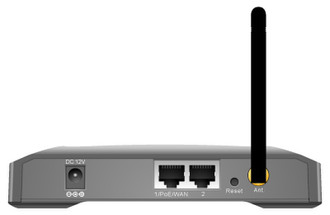
| DC-IN插口 |
Y |
| 广域网接口 |
Ethernet (RJ-45) |
协议
| 动态主机配置协议服务器 |
Y |
| 动态主机配置协议客户 |
Y |
| 支持网络协议 |
PPTP, L2TP, PPPoE, Telnet |
性能
| 以太网的数据传输率 |
10, 100 Mbit/s |
| 调制 |
16-QAM, 64-QAM, DQPSK, BPSK, DBPSK, QPSK |
| 内置存储器 |
16 MB |
| 闪存 |
4 MB |
| 网上管理 |
Y |
| 接收机灵敏度 |
1Mbps @ -96 dBm\n2Mbps @ -94 dBm\n5Mbps @ -93 dBm\n11Mbps @ -89 dBm\n6Mbps @ -89 dBm\n9Mbps @ -89 dBm\n12Mbps @ -87 dBm\n18Mbps @ -86 dBm\n24Mbps @ -83 dBm\n36Mbps @ -80 dBm\n48Mbps- @ 75 dBm\n54Mbps @ -72 dBm |
其他功能
| 液晶显示器功率 |
Y |
| 网路功能 |
Fast Ethernet |
| 无线技术 |
802.11b/g |
| 遵守工业标准 |
IEEE 802.11b/g, IEEE 802.3, IEEE 802.3u, IEEE 802.3af |
| 支持数据传输率 |
1/2/5.5/6/9/11/12/18/24/36/48/54 Mb/s |
天线
| 天线接口类型 |
R-SMA |
| 天线增益水平(最大值) |
2 dBi |
另外
| 以太网路(RJ-45)连接接口数量 |
2 |
| 数据传输率(最大) |
100 Mbit/s |
| 输出电源 |
12V DC |
| 包括 AC 适配器 |
Y |
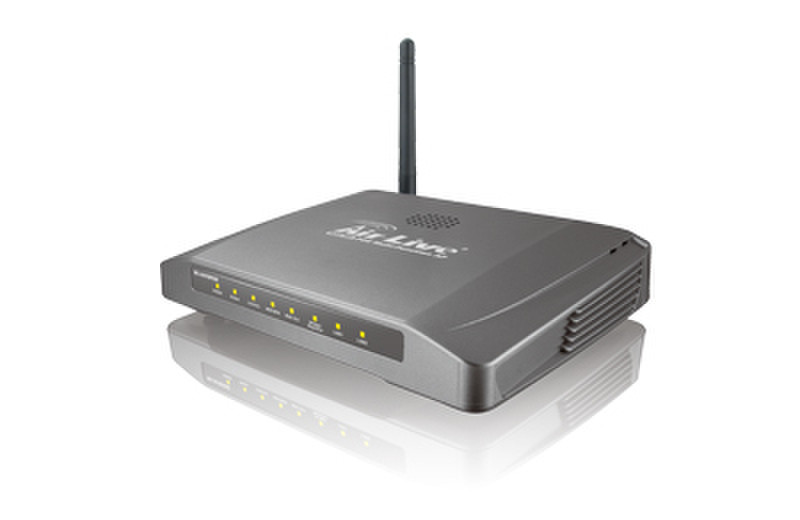
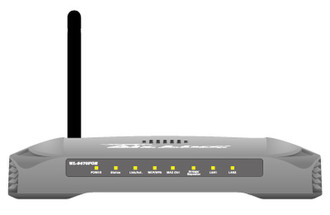
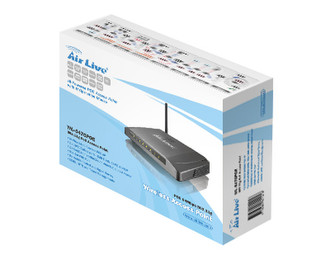
WL-5470POE, 2.4GHz, PoE, 16MB DRAM/2MB Flash, 802.11b/g, Fast Ethernet, 1 x WAN, 1 x LAN, 1 x 2dBi, DHCP, PPTP, L2TP, PPPoE, WPA, 12V DC, 236kg, Black
<b>Hi-Powered POE Access Point with 8 Operation Modes</b>
- High-Powered POE Access Point with 8 Operation Modes;
- SSH, HTTP and Telnet Managements;
- Up to 26dBm Output Power for both 11g and 11b(South America);
- Bandwidth Control and Antenna Alignment Signal Survey;
- Wireless Client Isolation, Watchdog, ACK Timeout, TX power adjustable;
- Clear Signal Technology for best performance in heavy interference;
- 4MB Flash, 16MB Flash, 802.3af POE.
As the leading global WISP solution provider, AirLive understands the application environments of WISP operators. The AirLive WL-5470POE is the new generation of AirLive AP that is built upon years of experience and heritage from our high performance Access Points series. It comes with brand new features such as increase in memory size to 4MB Flash Memory and 16MB for SDRAM, and the ClearSignal Technology to combat the ever increasing interference problem. Equipped with 802.3af Power over Ethernet Port, it allows the use of standard PoE kit or PoE Switch to power the Access Point.
<b>8 Wireless Operation Modes</b>
The AirLive WL-5470POE can operate in 8 different wireless modes. It can work as a Wireless Router, AP, Client, Repeater, Bridge, and much more. Whether it is for home, office, or WISP; the AirLive AP has a solution for you.
<b>ClearSignal Technology</b>
AirLive's Clear Signal Technology uses advanced hardware filtering and sensitivity adjustment to cancel out signal interference, often found in the highly congested 2.4GHz spectrum, making the WL-5470POE the most interference resistant AP currently in the industry.
<b>Up to 400mW of Output Power</b>
AirLive’s high quality hardware let the AP expand its RF output power up to 26dBm using South American firmware. That’s 4 times the output power of regular AP! It means much greater distance and coverage.
<b>Traffic Control QoS Function</b>
Traffic Control is a great tool to control the bandwidth of the WISP subscribers. Therefore, the WISP operators can offer different class of connection speeds for different subscription fees - just like the ADSL service! The AirLive advance Traffic Control firmware can control the bandwidth by Interface or IP/MAC.
<b>Dynamic Signal Survey Function for Antenna Alignment</b>
Having trouble align your antenna correctly to the other outdoor AP? The AirLive Wireless Signal Survey function tells you the receiving signal strength dynamically as your antenna turns. It automatically refreshes itself in the process, therefore, making antenna alignment much simpler than before.
<b>Wireless Site Survey Connection Wizard</b>
During a new WISP service installation, the installer will need to find out which outdoor AP provide the best signal in the area for connection. The AirLive wireless site survey function provides one step setup for this process. First, the site survey page shows which AP has the strongest the signal. Then the installer performs antenna alignment by using the signal survey function. At last, the installer simply clicks on “connect” button to establish connection. The site survey is available even in AP mode, so the installer can check the channels used by surrounding APs to avoid interferences.
<b>SSH, SSH2, and Telnet Management</b>
WL-5470POE provides comprehensive command line management through Telnet, SSH, or SSH2 interface. With SSH and SSH2, the administrator can manage through secured and encryped management interface through Internet safely.
<b>HTTP and HTTPS Management</b>
WL-5470POE provides both secured and easy web browser management through HTTP and HTTPS protocol. Simply open your web browser and type in the IP address of the AP to start. With the HTTPS secured management, administrators no longer need to worry about leaking information when doing web management. All the commands are encrypted with SSL to prevent hackers from tapping the information.
<b>Wireless Client Isolation</b>
AirLive firmware’s Client Isolation function protects the security and privacy of each individual subscriber. Therefore, subscriber does not need to worry about hacker attacks in the same wireless network.
<b>Emergency Recovery</b>
How many times your machine crashed and lost access completely? The AirLive’s Emergency web server function means you can recover your AP even during if the machine failed during a firmware upgrade. This greatly reduces the service loading for WISP operators.
<b>Power over Ethernet</b>
For applications that require user to put a network device (such as AP) in a place where there is no electrical outlet available, the Power over Ethernet is the best solution. Power over Ethernet allows both data and electricity to be transmitted over a Cat.5 UTP/STP cable at up to 100 meter of distance. This allows electronic devices to be placed in the outdoor or difficult to reach places, while utilizing the power source and the Ethernet network indoor.