处理器
| 处理器代号(codename) |
Sandy Bridge |
| 处理器支持显存频率 |
1066, 1333 MHz |
| 处理器支持内存通道 |
Dual |
| 总线频率 |
30 |
| 处理器运行模式 |
64-bit |
| 处理器支持内存类型 |
DDR3-SDRAM |
| 总线类型 |
DMI |
| 处理器支持内存带宽(最大值) |
21 GB/s |
| 处理器支持最大内存 |
32 GB |
| 处理器高速缓存类型 |
Smart Cache |
| 处理器安装数量 |
1 |
| 处理器加速频率 |
3.3 GHz |
| 处理器高速缓存 |
6 MB |
| 处理器光刻 |
32 nm |
| 散热设计功耗 (TDP) |
95 W |
| PCI Express 通道数的最大值 |
16 |
| 步进 |
D2 |
| 核心的处理器数量 |
4 |
| PCI Express插槽版本 |
2.0 |
| 处理器频率 |
3 GHz |
| 外壳温度 |
72.6 °C |
| 处理器支持 ECC 功能 |
N |
内存参数
| 内存时钟速度 |
1333 MHz |
| 内存布局 |
1 x 2 + 1 x 4 GB |
| 内存插槽数量 |
2x DIMM |
| 最大内部存储 |
8 GB |
| 内存类型 |
DDR3-SDRAM |
| 内置存储器 |
6 GB |
处理器的特殊功能
| 英特尔®快速同步视频技术 |
Y |
| 英特尔® 内线™ |
Y |
| 英特尔®64 |
Y |
| 英特尔® 双显示功能技术 |
Y |
| CPU配置(最大) |
1 |
| 可选用的嵌入式选项 |
N |
| 英特尔®直接输入/输出硬件辅助虚拟化技术 (Intel® VT-d) |
N |
| 英特尔®超线程技术 |
N |
| 英特尔®Turbo Boost技术 |
Y |
| 英特尔® 增强暂停状态 |
Y |
| 支持指令集 |
SSE4.1, AVX, SSE4.2 |
| 英特尔® 快速内存访问 |
Y |
| 英特尔® Flex内存访问 |
Y |
| 执行禁止位 |
Y |
| 闲置状态 |
Y |
| 热监测技术 |
Y |
| 英特尔®可信执行技术 |
N |
| 处理器封装尺寸 |
37.5 x 37.5 mm |
| Processor ARK ID |
53446 |
| 处理器代码 |
SR02L |
| 英特尔®vPro™ 技术 |
N |
| 英特尔®VT-x的扩展页表(EPT) |
Y |
| 英特尔® FDI技术 |
Y |
| 增强型英特尔®SpeedStep动态节能技术 |
Y |
| 英特尔® 身份保护技术(Intel® IPT) |
1.00 |
| 英特尔®无线显示(WiDi)技术 |
N |
| 英特尔®清晰视频高清技术 |
Y |
其他功能
| 以太网接口类型 |
Gigabit Ethernet |
| 麦克风连接 |
3.5 mm |
| Mac兼容性 |
N |
| 平台 |
PC |
| 遵守工业标准 |
IEEE 802.3, IEEE 802.3u, IEEE 802.3ab |
| 图形适配器系列 |
NVIDIA, Intel |
| SMP(适用于表面安装的封装形式)处理器的最大数量 |
1 |
| 耳机连接插孔 |
3.5 mm |
| 软盘驱动器的安装 |
N |
| HDMI |
Y |
| 电源类型 |
AC/DC |
图像
| 独立显存类型 |
GDDR5 |
| 板载图形适配器基本频率 |
850 MHz |
| 板载图形适配器系列 |
Intel HD Graphics |
| 板载图形适配器 |
Y |
| 板载图形适配器设备 ID |
0x102 |
| 独立显卡适配器內存 |
1024 GB |
| 板载图形适配器动态频率(最大值) |
1100 MHz |
| 板载图形适配器支持的显示器数量 |
2 |
存储介质
| 硬盘容量 |
1000 GB |
| 总存储容量 |
1000 GB |
| 集成读卡器 |
N |
| 安装的硬盘驱动器的数量 |
1 |
| 硬盘接口 |
Serial ATA |
性能
| 音频系统 |
HD |
| 音频输出通道数量 |
7.1 channels |
端口 & 界面
| Line-in |
Y |
| HDMI端口数量 |
1 |
| DVI端口 |
N |
| Line-out |
Y |
| 耳机输出端口 |
1 |
| S/PDIF输出接口 |
Y |
| 麦克风/音频输入插孔 |
Y |
| USB 3.0(第 1代3.1)Type-A 端口数量 |
2 |
联网
| 布线技术 |
10/100/1000Base-T(X) |
| 网路唤醒功能 |
Y |
| 以太网的数据传输率 |
10, 100, 1000 Mbit/s |
| 无线局域网连接 |
N |
另外
| InTru™3D技术 |
Y |
| 主板晶片 |
Intel H61 |
| 以太网路(RJ-45)连接接口数量 |
1 |
| 系统总线 |
5 GT/s |
| 以太网连接器 |
Y |
| 英特尔®AES新指令 |
Y |
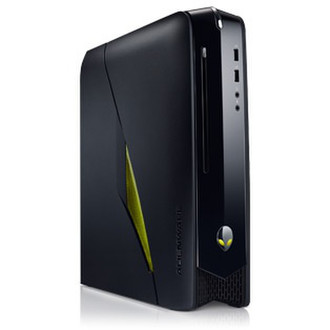
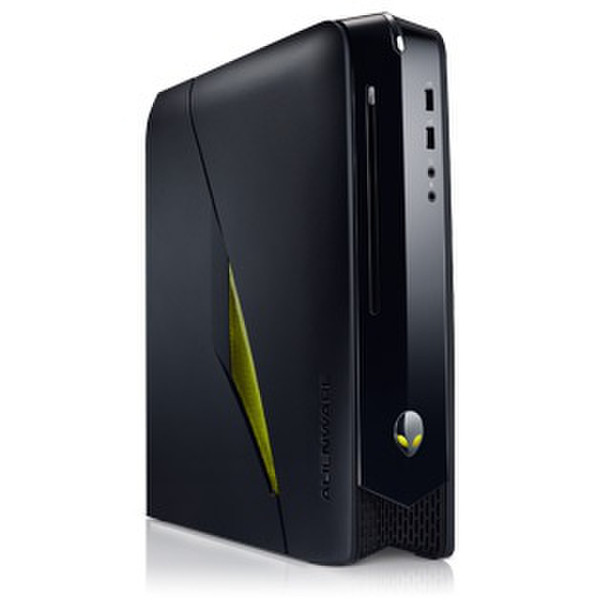
60.96 cm (24 ") 1920 x 1080 px, 16:9, 5 ms, 250 cd/m2, Intel Core i5-2320 (6M Cache, up to 3.30 GHz), 6GB DDR3, 1TB HDD, Blu-Ray ROM, Intel HD 2000, NVIDIA GeForce GTX 555 1GB GDDR5, Gigabit Ethernet, 802.11g/n, 6 x USB 2.0, 2 x USB 3.0, HDMI, 330 W, 5490 g, Black, Mini Tower, Windows 7 Home Premium SP1 64-bit
Pure processing power.
Alienware X51 packs options including the powerful Intel® Core™ i7 processor: The Brains leading you to epic new victories.
You've got speed.
Run several high-end applications with ease. Alienware X51 offers up to 8GB of high-performance dual-channel DDR3 memory.
Release your potential.
There are always new obstacles to face and new challenges to conquer, and Alienware X51 will be with you every step of the way.
A small system hides big entertainment power.
Whether standing vertically or laying horizontally, Alienware X51 turns virtually any living space into a world of high-end entertainment possibilities.
Build. Modify. Adapt.
With Alienware X51, desktop component upgrades are a breeze. From CPU and graphics cards to HDD and memory, you can keep your components up to date when other machines go extinct.
Take command of your game domain.
Alienware Command Center software features a powerful suite of customization options to make your X51 your own. Don't just play a game. Play your game.
AlienAdrenaline
The new AlienAdrenaline feature enables Game Mode, which lets you give each of your games a unique profile on your system. Disable unnecessary programs and activate your music player when you launch one game, or bring up key Web links when you launch another.
AlienFX
AlienFX® System Lighting Technology gives you access to a variety of themes and 8,000 distinct lighting combinations, so you can personalize as much as you like. Customize your system with game themes that respond to many in-game events with unique lighting effects to complete your immersion.
AlienFusion
AlienFusion power management controls allow you to configure your settings in order to maximize performance and efficiency while managing power usage. Crank up the settings for hardcore gaming and resource-intensive tasks, or scale it back for running everyday programs.
Complete your Alienware X51 experience
Your Alienware X51 is just the start. When you buy from Dell, you can get much more than just a gaming system. You can customize an experience that's just right for you.