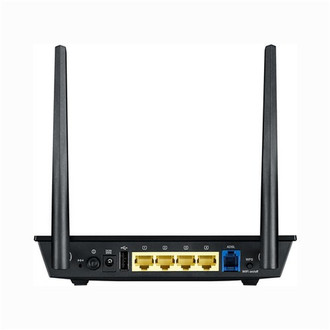
端口 & 界面
| USB端口 |
Y |
| RJ - 11端口数量 |
1 |
| DC-IN插口 |
Y |
天线
| 可拆式天线(S) |
Y |
| 天线增益水平(最大值) |
2 dBi |
| 天线类型 |
External |
| 天线数量 |
2 |
以太网LAN特性
| 以太网的数据传输率 |
10, 100 Mbit/s |
| 以太网LAN接口类型 |
Fast Ethernet |
安全
| MAC(媒体存储控制)地址过滤 |
Y |
| 过滤 |
Y |
| 网页(URL)过滤 |
Y |
| 防火墙 |
Y |
| 系统事件日志 |
Y |
| DoS攻击的预防 |
Y |
| 支持虚拟专用网 |
IPSec Pass-Throuth\nPPTP Pass-Through\nL2TP Pass-Through\nPPTP server |
| 防火墙 |
NAT, SPI |
WAN 广域网连接
| SIM卡插槽 |
N |
| DSL WAN |
Y |
| 3G/4G USB 调制解调器的兼容性 |
Y |
| 广域以太网 |
Y |
无线局域网的特点
| WLAN的数据传输率(最大值) |
300 Mbit/s |
| Wi-Fi 频段 |
Single-band (2.4 GHz) |
| Wi-Fi标准 |
IEEE 802.11n |
| 无线局域网类型 |
IEEE 802.11n, IEEE 802.11g, IEEE 802.11b |
另外
| 以太网连接器 |
Y |
| 包括 AC 适配器 |
Y |
| 以太网路(RJ-45)连接接口数量 |
4 |
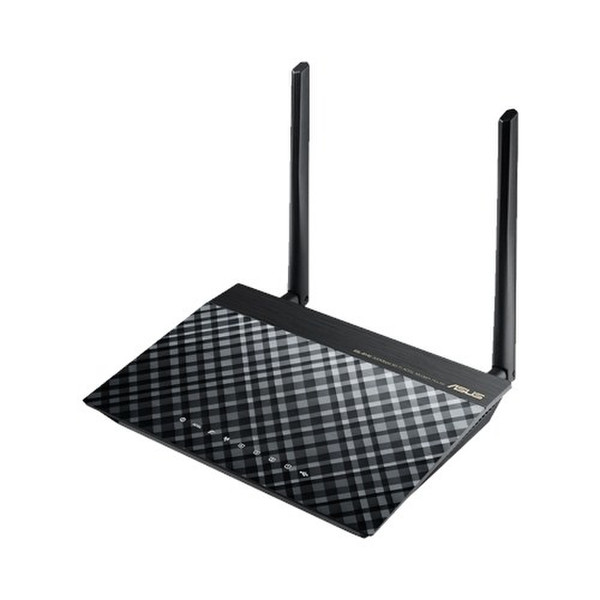
DSL-N14U Wireless ADSL modem router with DSL, Ethernet or 3G/4G LTE internet connections
<b>Fast Wi-Fi, with more space and less clutter</b>
The ASUS DSL-N14U ADSL modem router has Wi-Fi speeds up to 300Mbit/s. It replaces the ADSL modem from your internet service provider, saving space and reducing clutter. With easy, CD-free installation and reliable data transmission, DSL-N14U is a complete wireless solution for ADSL users, and also features a multifunctional USB 2.0 port.
<b>Total flexibility with DSL, Ethernet or 3G/4G LTE internet connections</b>
DSL-N14U has multiple ways to connect to the internet, with a choice of DSL, Ethernet or 3G/4G LTE (Requires compatible USB dongle). You can use DSL-N14U as a DSL modem Wi-Fi router or a standalone Wi-Fi router according to your needs. And with the ability to switch instantly between connections if one fails (and switch back again when it’s fixed) or combine multiple connections for more bandwidth, it’s perfect for reliable, always-on internet connectivity.
<b>Easy 30-second router setup</b>
Use your smartphone, tablet, or PC to effortlessly set up your ASUS router in less than 30 seconds* and in only 3 easy steps. Simply connect the cables to the router, open a Web browser, and follow the setup wizard to get you to the internet in no time.
ASUS-tested and verified setup time. Actual duration may vary by ISP, specific connection type, location, and other factors.
<b>Multi-functional built-in USB port</b>
The built-in USB 2.0 port allows you to connect external storage, printers, and other devices to the DSL-N14U and share them with other users over the network.
<b>AiCloud - Sync. Share. Stream. Your world on demand</b>
ASUS AiCloud keeps you connected to your data wherever and whenever you have an internet connection. It links your home network and online Web storage service and lets you access it through the AiCloud mobile app on your iOS or Android smartphone or through a personalized URL in a Web browser. Even better, the new Router-to-Router Sync function allows you to synchronize your stuff with storage devices connected to other compatible ASUS routers— it’s as simple as choosing a sync folder. Sharing with friends and family is now easier than ever
Works with select Web storage services only.
<b>Robust control and optimization with ASUSWRT</b>
With the eay-to-use ASUSWRT Dashboard you can setup, monitor and control your network from one intuitive interface.
DSL-N14U features special ADSL-related enhancements to the intuitive ASUSWRT graphical interface, inlcuding a signal-to-noise ratio (SNR) measuring tool that can help customers monitor the stability of an ADSL connection. A traffic monitor shows the data sent and received via the WAN, wired and wireless networks, while a reporting tool allows customers to send feedback about connection issues directly to a technical support team, with technical log files automatically included. Try it.
<b>VPN server enabled</b>
Easily set up a VPN server to browse the web and access data with PPTP encryption— wherever you are.
<b>Download and stream anywhere</b>
Download Master and enhanced media server let you download and play multimedia files stored on router-attached USB storage on a wide range of compatible devices such as PC, pad, PS3, Xbox, and smart TV. Download Master can also download files while your PC is turned off, and allows you to manage and monitor download status remotely.
<b>Dedicated Wi-Fi for your visitors</b>
Share your internet connection with your guests with no need to share your personal password or network resources. ASUS Guest Network supports up to three separate guest networks, each with its own usage limits and password. Guests cannot access your primary network or any other connected devices.
<b>Keep Up to Date!</b>
Remember to always keep your device’s firmware up to date so you can benefit from the very latest service and security enhancements — and get exciting new features!