技术细节
| 支持板载图形适配器 DirectX 版本 |
RJ-45 |
Fluke Networks OneTouch AT 1T-3000, plus ClearSight Analyzer Software
An all-in-one Gigabit Ethernet troubleshooter for copper and fiber.
<b>Quick Facts</b>
- Greatly reduces troubleshooting time.
- AutoTest feature replaces multiple tools, and pass/fail analysis instantly identifies problems.
- Features a graphical, touchscreen interface.
<b>Further Details</b>
<b>All-in-one</b>
The OneTouch AT incorporates two 10-/100-/1000-Mbps RJ-45 Ethernet test ports, two 100/1000-Mbps SFP fiber optic transceiver ports, and an internal 802.11 a/b/g/n dual band radio. Simultaneously test your wired Ethernet and wireless Wi-Fi networks and easily compare performance with side-by-side test results.
<b>Understand performance from the client connection.</b>
Most network trouble tickets start where the client device is connected to the network—where the device could be a PC, an IP phone, a printer, a POS terminal, an industrial equipment controller, or a medical imager. Common issues include "doesn't work," "can't connect," "files unreachable," "application unresponsive," and "the network is slow." The OneTouch assists you in troubleshooting these issues—or proving that the network is not the cause—by emulating the client device and assessing network performance.
<b>Performance measurement from the cable to the cloud</b>
The cause of a network problem can be elusive. The OneTouch AT identifies problem root cause by measuring and analyzing the performance of the critical network components: the network cabling, the delivery of Power over Ethernet (PoE), the connection to the nearest switch, the connection to the nearest access point, and the performance of key network services and server-based applications.
<b>Copper and fiber optic cable testing</b>
Understand cable performance by measuring twisted-pair cable wiremap and length. Use cable identifiers and IntelliTone™ toning to locate and identify cables. Measure the optical power received through fiber optic cables. Verify the cleanliness of fiber optic connections by viewing connector end faces with the FiberInspector™ USB video probe.
<b>PoE testing</b>
Verify the successful delivery of PoE with the TruePower™ load test. Measure PoE unloaded and under load. Emulate a 802.3at (PoE+) Class 1 - 4 powered device and measure power up to 25.5 watts.
<b>Wired and Wi-Fi client connectivity testing</b>
Understand how a client connects to the wired infrastructure by testing the link between the client and the nearest switch; identifying the nearest switch, slot, and port; and monitoring key switch port statistics. Or understand how a client connects to the Wi-Fi infrastructure by testing the link between the client and the nearest access point; identifying the AP name, channel and security; observing the authentication and association process; and monitoring key AP and network statistics.
<b>Network service and application testing</b>
Determine if a network service or server-based application is the root cause of a reported problem by measuring availability and responsiveness. Choose the performance test appropriate for your service or application: ping (ICMP), connect (TCP), web (HTTP), file (FTP), multicast (IGMP), video (RTSP), or e-mail (SMTP). Touch the icon on the home page to get a detailed breakdown of application performance including DNS lookup time, server response time, and data rate. The measurements are presented side-by-side for easy wired/Wi-Fi and IPv4/IPv6 performance comparisons. A few examples: ping your WLAN controller, connect to Port 2000 on your VoIP call manager, download a page of an application with a web interface, upload or download a file from a server, subscribe to a multicast group, access video content from an on-demand streaming video server, or e-mail a text message to your mobile phone.
<b>Test local and cloud-based services.</b>
Understand the performance of network services and server-based applications hosted locally in the datacenter, on a corporate intranet server or on a server reached via the public Internet. Organize the tests by location by placing the test icon within the appropriate tier on the OneTouch AT home page. Measure service levels to the different tiers to spot problems.
<b>Become a troubleshooting expert.</b>
Use the intuitive touch interface to create test profiles, or test scripts, tailored to your network, services, and applications. Create simple profiles with only a few tests or advanced profiles consisting of dozens of tests. You can build profiles to accommodate different types of users, devices, locations or technologies. Once created, profiles can be saved for quick and easy reuse later. Create a library of standardized profiles to elevate the troubleshooting know-how of network support staff and to establish best practices for faster, more productive troubleshooting.
<b>Get answers in seconds.</b>
Test everything defined in a profile automatically with the one-touch AutoTest. As the AutoTest progresses from the physical layer, through the wired and wireless infrastructure, to network services and applications, clear pass/fail indicators appear next to the network element under test. Each network element—cable, switch, AP, service, application, Wi-Fi communication bands—is represented graphically. A top-level pass/fail indicator provides the overall status at a glance. Touch an icon to get detailed performance information.
<b>Prove that your Wi-Fi network is operating at peak levels.</b>
The unique Veri-Fi test provides comprehensive verification of the Layer 1 through 3 network infrastructure by sending test traffic between the OneTouch AT's wireless and wired connections. Measure throughput, loss, latency, and jitter at rates up to 100Mbps in upstream and downstream directions.
<b>Solve complex issues.</b>
Capture traffic when a packet-level view is required to solve a network or application issue. Filter the traffic to capture what is most important. Export the capture file via the management port or SD card to your favorite protocol analyzer for decoding and analysis.
<b>Tap into the relevant traffic easily.</b>
Use the built-in inline aggregating copper and fiber optic TAP to access the traffic running between the client and the network. Avoid the complexity, time, and cost required to configure switch mirror ports or to install standalone TAPs.
<b>Streamline collaboration.</b>
Collaborate with peers, consultants, integrators and vendors more effectively by sharing packet captures, screen shots and AutoTest reports. The OneTouch user interface can even be viewed and controlled remotely through a PC. Attach a web cam to the OneTouch AT to share a view of the test environment.
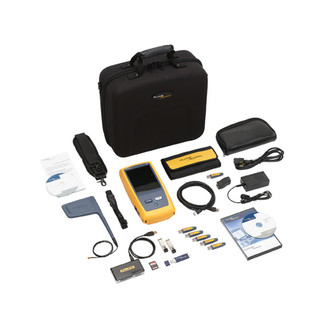
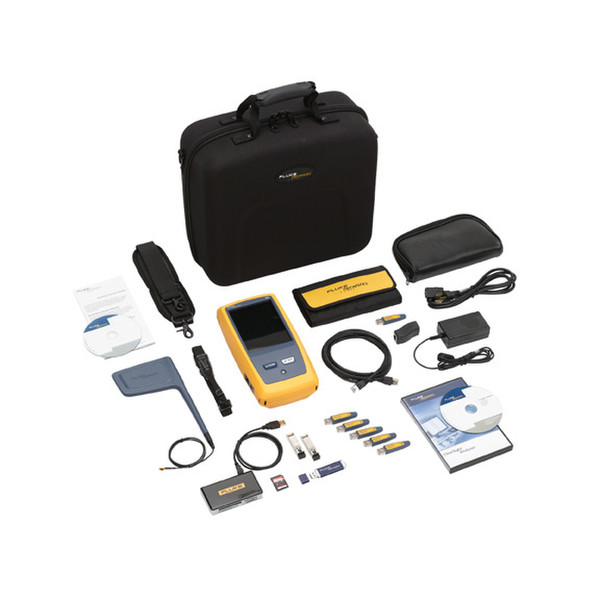
<b>What's included:</b>
- Module and test frame
- ClearSight™ Analyzer Software
- Carrying strap
- AC adapter and line cord
- Wiremap adapters #1–#6
- RJ-45 coupler
- RJ-45 patch cable
- External directional antenna with mounting clip
- SD card
- USB SD card reader
- USB flash drive
- (2) 1000BASE-SX SFP fiber transceivers
- Accessories pouch
- Carrying case
- Getting started guide
- CD with user manual