端口 & 界面
| 红外数据端口 |
Y |
| DVI端口 |
Y |
| 复合视频 |
1 |
| DVI-D接口数量 |
1 |
| 扬声器输出 |
1 |
| DVI-I接口数量 |
1 |
| 音频(左、右声道)输出 |
1 |
| AUX 输入 |
Y |
| HDMI输入 |
2 |
| RS-232C |
Y |
| 分量视频(YPbPr/YCbCr)输入 |
1 |
| VGA(D-SUB)输入端口 |
2 |
| DisplayPort 数量 |
2 |
| USB 端口数量 |
2 |
| HDMI端口数量 |
2 |
设计
| 边框宽度(顶部) |
15.6 mm |
| 边框宽度(底部) |
15.6 mm |
性能
| 面板寿命 |
60000 h |
| 集成电视调谐器 |
N |
| OSD语言数 |
12 |
| 屏幕显示 |
Y |
计算机系统
| 电脑系统 |
N |
| 支持的视频格式 |
BMP, GIF, JPG |
显示器
| HD 类型 |
Full HD |
| 原机长宽比 |
16:9 |
| 显示类型 |
LED |
另外
| 以太网连接器 |
Y |
| 以太网路(RJ-45)连接接口数量 |
1 |
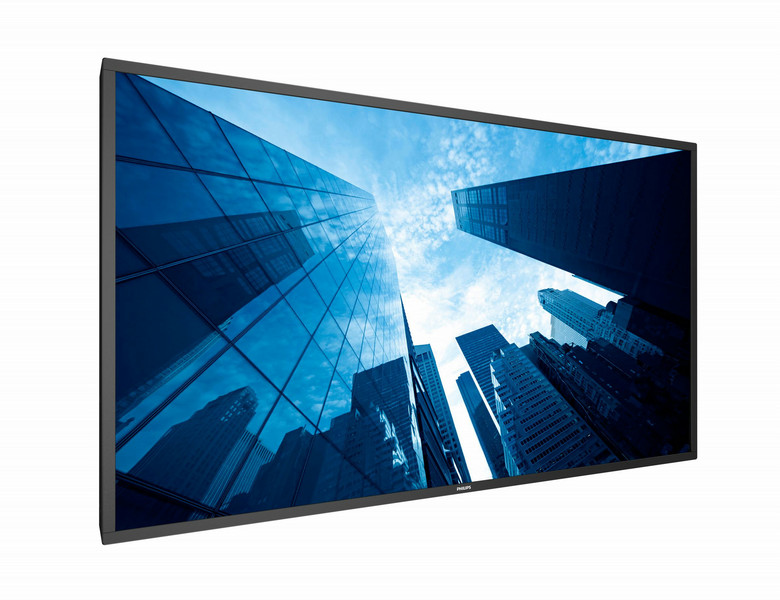
119.38 cm (47 ") Direct LED, 1920x1080, 16:9, 2000cd/m², 10ms, 1.07B, HDMI, VGA, DVI-D, DisplayPort, USB, Component, Composite, RJ45, RS232C, 2x 10W RMS
Superb image visibility and clearer images
With this high brightness Signage Solution display, you will enjoy all the benefits of state-of-the-art connectivity and content management possibilities while being ensured that remote management safeguards the lowest cost of ownership.
Full HD LED for brilliant images with incredible contrast
Picture Quality matters. Regular displays deliver quality, but you expect more. Imagine crisp detail paired with high brightness, incredible contrast and realistic colors for a true to life picture.
Manage and control your network remotely via SmartControl
SmartControl software suite lets you remotely control and manage your network of displays via RJ45 and RS232C. Easily identify your displays and fine-tune all display settings including resolution, brightness, contrast, video wall configurations and cloning of your settings over your complete network.
Optional OPS Insert to create an all-in-one solution
Turn your display into an all-in-one digital signage solution and create a display network which is connected, intelligent and secure. Open Pluggable Specification (OPS) is an industry standard slot into which you can add an OPS-standardized media player. This cable free solution gives you the ability to install, use or maintain your hardware whenever you need.
Connect and control your content via the cloud with HTML5
Connect and control your content via the cloud with the integrated HTML5 browser. Design your signage content online and connect it with a display or with your complete network. Simply plug in a RJ45 internet cable for network connection, connect the display with the dedicated url-address and you are ready to play your cloud based content.
Free and easy-to-use content management with SmartCMS
Free and easy-to-use content management system that works exclusively with Philips Sigage Solutions displays to manage your digital signage content. With SmartCMS you can create and schedule your own content over 24 hours every day. Simply create your network, design your content, schedule your playlist and you are ready to play!
Keep your content up and running with FailOver
Keeping your content up and running is critical for demanding commercial applications. While it is unlikely you will face a content disaster, FailOver provides 24/7 protection with a revolutionary technology that plays back-up content on screen in the event of a media player failure. FailOver automatically kicks in when the primary input fails. Simply select a primary input connection and a FailOver connection and your ready for instant protection.
Schedule what you want, when you want with SmartPlayer
Turn your USB into a true cost effective digital signage device. Simply save your content (video, audio, pictures) on your USB and plug into your display.Create your playlist and schedule your content via the on screen menu, and enjoy your own created playlists anytime, anywhere.
SmartPower for energy saving
The backlight intensity can be controlled and pre-set by the system to reduce the power consumption by up to 50%, which saves substantially on energy costs.
Full HD LED for brilliant images with incredible contrast
Full HD LED for brilliant images with incredible contrast
Picture Quality matters. Regular displays deliver quality, but you expect more. Imagine crisp detail paired with high brightness, incredible contrast and realistic colors for a true to life picture.
Manage and control your network remotely via SmartControl
Manage and control your network remotely via SmartControl
SmartControl software suite lets you remotely control and manage your network of displays via RJ45 and RS232C. Easily identify your displays and fine-tune all display settings including resolution, brightness, contrast, video wall configurations and cloning of your settings over your complete network.
Optional OPS Insert to create an all-in-one solution
Optional OPS Insert to create an all-in-one solution
Turn your display into an all-in-one digital signage solution and create a display network which is connected, intelligent and secure. Open Pluggable Specification (OPS) is an industry standard slot into which you can add an OPS-standardized media player. This cable free solution gives you the ability to install, use or maintain your hardware whenever you need.
Connect and control your content via the cloud with HTML5
Connect and control your content via the cloud with HTML5
Connect and control your content via the cloud with the integrated HTML5 browser. Design your signage content online and connect it with a display or with your complete network. Simply plug in a RJ45 internet cable for network connection, connect the display with the dedicated url-address and you are ready to play your cloud based content.
Free and easy-to-use content management with SmartCMS
Free and easy-to-use content management with SmartCMS
Free and easy-to-use content management system that works exclusively with Philips Sigage Solutions displays to manage your digital signage content. With SmartCMS you can create and schedule your own content over 24 hours every day. Simply create your network, design your content, schedule your playlist and you are ready to play!
Keep your content up and running with FailOver
Keep your content up and running with FailOver
Keeping your content up and running is critical for demanding commercial applications. While it is unlikely you will face a content disaster, FailOver provides 24/7 protection with a revolutionary technology that plays back-up content on screen in the event of a media player failure. FailOver automatically kicks in when the primary input fails. Simply select a primary input connection and a FailOver connection and your ready for instant protection.
Schedule what you want, when you want with SmartPlayer
Schedule what you want, when you want with SmartPlayer
Turn your USB into a true cost effective digital signage device. Simply save your content (video, audio, pictures) on your USB and plug into your display.Create your playlist and schedule your content via the on screen menu, and enjoy your own created playlists anytime, anywhere.
SmartPower for energy saving
The backlight intensity can be controlled and pre-set by the system to reduce the power consumption by up to 50%, which saves substantially on energy costs.
Projects a super high brightness picture even in daylight
Enjoy an excellent visual experience even in areas illuminated by direct sunlight thanks to the 2000 nit panel. The high brightness offers a wide array of new implementation possibilities especially in locations that have high ambient light levels, delivering crystal clear images for all locations where ambient brightness is an issue.