其他功能
| 包括显示器 |
Y |
| 图形适配器随机存取存储器数字/模拟转换器 |
533 MHz |
| 最大图形显示内存 |
224 MB |
| PCI Express × 1插槽 |
1 |
| 音频输出通道数量 |
5.1 channels |
| 无线技术 |
802.11 b/g/n |
| Line-in |
Y |
| Line-out |
Y |
| 网路功能 |
Realtek 8111C Gigabit Ethernet |
处理器
| 处理器核心电压(AC) |
1.25-1.4 V |
| 处理器高速缓存 |
1 MB |
| 处理器光刻 |
45 nm |
| 散热设计功耗 (TDP) |
8 W |
| 处理器代码 |
SLG9Y |
| 处理器高速缓存类型 |
L2 |
| 无冲突处理器 |
N |
| 处理器前端汇流总线 |
533 MHz |
| Number of Processing Die Transistors |
94 M |
| 结温 |
100 °C |
| FSB奇偶校验 |
N |
| 总线频率 |
12 |
| 处理器运行模式 |
64-bit |
| 步进 |
C0 |
| 核心的处理器数量 |
2 |
| 处理器频率 |
1.6 GHz |
| 外壳温度 |
85.2 °C |
| 处理器支持 ECC 功能 |
N |
| 总线类型 |
FSB |
处理器的特殊功能
| 英特尔®快速存储技术 |
N |
| 英特尔® 快速内存访问 |
N |
| 英特尔® Flex内存访问 |
N |
| 执行禁止位 |
Y |
| 闲置状态 |
N |
| 热监测技术 |
N |
| 英特尔®可信执行技术 |
N |
| 实体位址扩充(PAE) |
32 bit |
| 英特尔®虚拟化技术(VT -x) |
Y |
| 处理器封装尺寸 |
22 mm |
| Processor ARK ID |
35641 |
| 英特尔®快速同步视频技术 |
N |
| 英特尔® 内线™ |
N |
| 物理地址扩展(PAE) |
Y |
| 英特尔®64 |
Y |
| 英特尔® 清晰视频技术 |
N |
| 英特尔® 双显示功能技术 |
N |
| 可选用的嵌入式选项 |
N |
| 英特尔®直接输入/输出硬件辅助虚拟化技术 (Intel® VT-d) |
N |
| 英特尔® 防盗技术 |
N |
| 英特尔®超线程技术 |
Y |
| 英特尔®Turbo Boost技术 |
N |
| 英特尔® 增强暂停状态 |
N |
| 英特尔® 我的WiFi技术 |
N |
| 英特尔®MID清晰视频技术 |
N |
| 英特尔®vPro™ 技术 |
N |
| 英特尔®VT-x的扩展页表(EPT) |
N |
| 英特尔® FDI技术 |
N |
| 增强型英特尔®SpeedStep动态节能技术 |
N |
| 英特尔®基于需求开关 |
N |
| 英特尔®无线显示(WiDi)技术 |
N |
| 英特尔®清晰视频高清技术 |
N |
| 支持指令集 |
SSE2, SSE3, SSSE3 |
图像
| 板载图形适配器 |
Y |
| 独立显卡类型 |
Intel GMA 950 |
内存参数
| 内存类型 |
DDR2-SDRAM |
| 内置存储器 |
2 GB |
存储介质
| 硬盘转速 |
5400 RPM |
| 兼容性内存条 |
MMC, SD |
| 总存储容量 |
160 GB |
| 集成读卡器 |
Y |
| 硬盘接口 |
Serial ATA II |
端口 & 界面
| 耳机输出端口 |
1 |
| 麦克风/音频输入插孔 |
Y |
| VGA(D-SUB)端口数量 |
1 |
另外
| InTru™3D技术 |
N |
| 主板晶片 |
Intel 945GC Express |
| Processing die size |
52 mm² |
| 英特尔®AES新指令 |
N |
| 以太网路(RJ-45)连接接口数量 |
1 |
X500VA, Intel ATOM 330 Dual Core, Intel 945GC + ICH7, 2 GB DDR2 SO-DIMM, 160 GB 2.5" SATA, 39.624 cm (15.6 ") Touchscreen, 1366 x 768, GMA950, OpenSUSE Linux
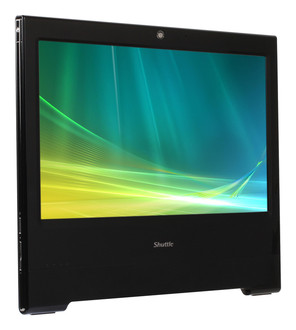
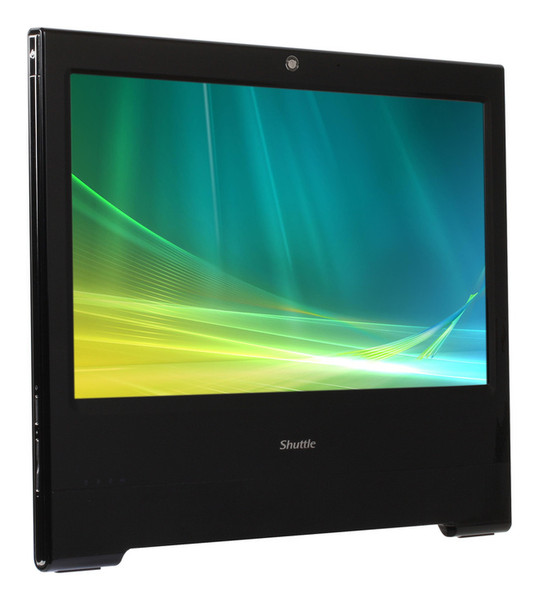
The Shuttle X500VA is an all-in-one PC boasting a 39.6cm (15.6-inch) touchscreen LCD powered by Intel's Atom 330 dual-core processor. Intended for use in the home environment, the X500VA features 2GB of memory, a 160GB 2.5 inch hard disk drive and pre-installed Linux operating system. Equipped with Intel's GMA950 onboard graphics, it provides generous performance for daily computing with internet and office applications. A webcam, built-in speakers, card reader, WLAN and other features leave nothing you could ask for. Have any applications start up quickly by just touching the screen for working most swiftly and conveniently.
All applications at your fingertips
The innovative touchscreen technology delivers the simplest operation possible and makes the screen the centre of action. Its high-quality design lets you control the whole range of multimedia - music, movies, video playback and web browsers start by just touching the screen.
Dual Core. Do more.
The vast majority of the existing netbooks and all-in-one PCs with an Intel Atom CPU use the original Single Core version. In contrast to this, Shuttle's all-in-one PC X 5000TA stands out from the crowd with its embedded Intel Atom 330 Dual Core processor, which is boosting the productivity of the PC system, particularly with regards to multithreaded applications.
All-in-one PC
Your complete PC system with many components already built in comes in just one single device! This includes the webcam, microphone, mainboard, display, touchscreen input interface, Wireless LAN module and speakers. Saves you more space, looks simply stylish, less wiring.
Slim and chic
Designed as space-savers, this 15.6 inch all-in-one desktop PC only measures 3.6cm in depth.
Fannless power supply
External, fanless 65W power supply for whisper quiet operation
Kensington Lock
This is a small, metal-reinforced hole as part of an anti-theft system.
(The lock-and-cable apparatus is not included.)
VGA Port
This VGA port can be used to connect a secondary external LCD display or beamer to the PC. It supports the clone mode operation.
Carrying handle
Cleverly, the X 5000TA’s stand can be pulled up to serve as a handle - easy to move and light to carry with one hand.
VESA mounting
The stand on the rear can easily be removed unveiling four VESA mounting screw holes that can be used for mounting arms and other mounting devices from a variety of manufacturers.