系统要求
| 最小硬盘空间 |
200 MB |
| 最低内存 |
512 MB |
| 最低处理器 |
Intel Pentium 4/AMD Athlon XP, G4 |
Superior color results in a fraction of the time!
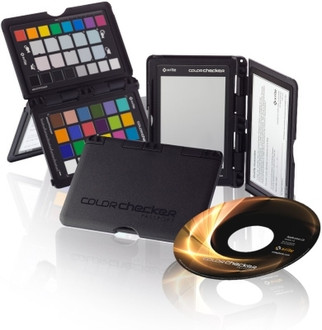
Passport model shootColorChecker Passport is a powerful ‘capture to edit’ color solution for any photographer looking for more accurate, consistent color and creative flexibility. And when you combine ColorChecker Passport with Adobe® Imaging solutions you’ll gain even greater benefits. ColorChecker Passport combines three photographic targets into one pocket size protective, multi-positionable case that adjusts to any scene. Together with the included camera calibration software, you get the ultimate in functionality, flexibility and portability.
There are so many ways to incorporate ColorChecker Passport into your Raw workflow. Whether you take advantage of the entire solution, or just a couple of ColorChecker Passport’s many features, you’ll realize improved quality and productivity almost immediately.
Creative Enhancement Target – neutralize and create your look with enhancement patches; check and evaluate shadow details or highlight clipping; check and control color shifting
Passport Classic
Classic Target – industry standard color reference target for creating DNG profiles and for evaluating specific colors
Passport White Balance
White Balance Target – create custom in-camera white balance for a consistent white point in a set of images, eliminating the need to correct each image later
Passport Software
Camera Calibration Software – includes both a desktop application and an Adobe® Lightroom® Plug-In for creating custom DNG profiles