Technische Details
| Formfaktor |
Set-top |
| On-Screen-Display (OSD) |
Y |
Audio
| Frequenzbereich |
30 - 20000 Hz |
| Übersprechen (1 kHz) |
70 dB |
| Dynamikumfang (1 kHz) |
80 dB |
| Verzerrung und Rauschen (1 kHz) |
65 dB |
| Audio D/A Konverter |
24-bit/192kHz |
| Signal-zu-Geräusche Verhältnis (SNR) |
90 dB |
| MP3-Bit-Raten |
32 - 320 Kbit/s |
Sicherheit
| Kindersicherung |
Y |
| Kindersicherung |
Y |
Anschlüsse und Schnittstellen
| Audio (L,R) Out |
1 |
| Digital Audio-Ausgang (koaxial) |
1 |
| Composite Video-Ausgang |
1 |
| Komponentenausgang Video (YPbPr/YCbCr) |
1 |
Speichermedien
| Integrierter Kartenleser |
N |
| Aufnahmedisk Typ |
Not supported |
| Playback Disk-Formate |
CD audio, CD video, SVCD, VCD |
| Playback-Disk Typ |
CD-RW, DVD-RW, DVD+RW, CD-ROM, CD, DVD+R, DVD, DVD-R, CD-R |
Zertifikate
| Energy Star-zertifiziert |
N |
Video
| Video Hochskalierung |
N |
| Progressiver Scan-Ausgang |
Y |
| Video D/A Konverter |
12-bit/108MHz |
Dateiformate
| Unterstützte Bildformate |
JPG |
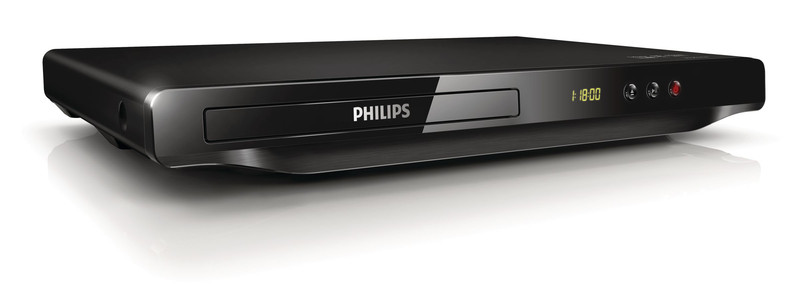
DVP3600X/77 - 12 bit, 108 MHz, DVD, DivX, NTSC, PAL, Dolby Digital
<b>Enjoy it all - from DVD</b>
Does size matter? Ever heard of less is more? Introducing the best value DVD player. No
complications! Just a simple set that plays practically any disc format, including your digital
photos with absolutely no compromise to picture quality.
<b>Play all your movies and music</b>
- Play CD, (S)VCD, DVD, DVD+- R/RW, DivX, MP3, WMA, JPEG
- DivX Ultra Certified for enhanced DivX video playback
- ProReader Drive for smooth playback on virtually any disc
<b>Bring audio and video to life</b>
- 12-bit/108MHz video processing for sharp and natural images
- 192kHz/24 bit audio DAC enhances analogue sound input
- Progressive Scan component video for optimized image quality
- Screen Fit for optimal viewing every time
<b>Fits any space, any lifestyle</b>
- Ultra-slim design that fits anywhere
<b>DivX Ultra Certified</b>
With DivX support, you are able to enjoy DivX encoded videos and movies from the Internet, including purchased Hollywood films, in the comfort of your living room. The DivX media format is an MPEG-4 based video compression technology that enables you to save large files like movies, trailers and music videos on media like CD-R/RW and DVD recordable disc for playback on your DivX Ultra Certified Philips Blu-ray or DVD player. DivX Ultra combines DivX playback with great features like integrated subtitles, multiple audio languages, multiple tracks and menus into one convenient file format.
<b>Multimedia DivX</b>
Play CD, (S)VCD, DVD, DVD+- R/RW, DivX, MP3, WMA, JPEG
<b>192kHz/24 bit audio DAC</b>
192KHz sampling enables you to have an accurate representation of the original sound curves. Together with a 24-bit resolution, more information is captured from the original analogue sound wave form, giving a much richer audio reproduction.
<b>Progressive Scan</b>
Progressive Scan doubles the vertical resolution of the image resulting in a noticeably sharper picture. Instead of sending a field comprising the odd lines to the screen first, followed by the field with the even lines, both fields are written at one time. A full image is created instantaneously, using the maximum resolution. At such a speed, your eye perceives a sharper picture with no line structure.
<b>ProReader Drive</b>
ProReader Drive lets you enjoy your movies and videos worry-free. Even when old discs get smudgy or scratched, you can rest assured that they will play right through from start to end - without any sign that they have been damaged. Using state-of-the-art technology, ProReader Drive converts weak analog signals into robust digital ones, extracting information that allows less-than-perfect discs to play smoothly through. Together with its ability to read virtually any video format, ProReader Drive gives you the unbeatable assurance that whatever you pop in will most definitely play.
<b>Screen Fit</b>
Whatever you’re watching, and on any TV, Screen Fit ensures that the picture fills the whole screen. Annoying black bars on the top and bottom are eliminated, without any tedious manual adjustments to make. Simply press the Screen Fit button, choose the format and enjoy your movie in full-screen