Security
| Firewall security |
SPI / NAT, MAC, URL, IP |
| MAC address filtering |
Y |
Ethernet LAN features
| Cabling technology |
10/100Base-T(X) |
| Ethernet LAN interface type |
Fast Ethernet |
| Ethernet LAN data rates |
10, 100 Mbit/s |
Other features
| Maximum data transfer rate |
0.15 Gbit/s |
| Remote administration |
TR-069, Telnet |
| Interface |
MDI/MDIX |
| Bandwidth |
2.4 GHz |
| Networking features |
Ethernet, Fast Ethernet |
| Input voltage |
100 - 240 V |
| Data transfer rate |
150 Mbit/s |
Management features
| Universal Plug and Play (UPnP) |
Y |
| Reset button |
Y |
| Web-based management |
Y |
Protocols
| DMZ support |
Y |
| DHCP server |
Y |
| Supported network protocols |
DHCP server |
Wireless LAN features
| Top Wi-Fi standard |
IEEE 802.11n |
| Wi-Fi standards |
IEEE 802.11b, IEEE 802.11g, IEEE 802.11n |
Additionally
| Ethernet LAN connection |
Y |
| AC adapter bundled |
Y |
| Ethernet LAN (RJ-45) ports quantity |
4 |
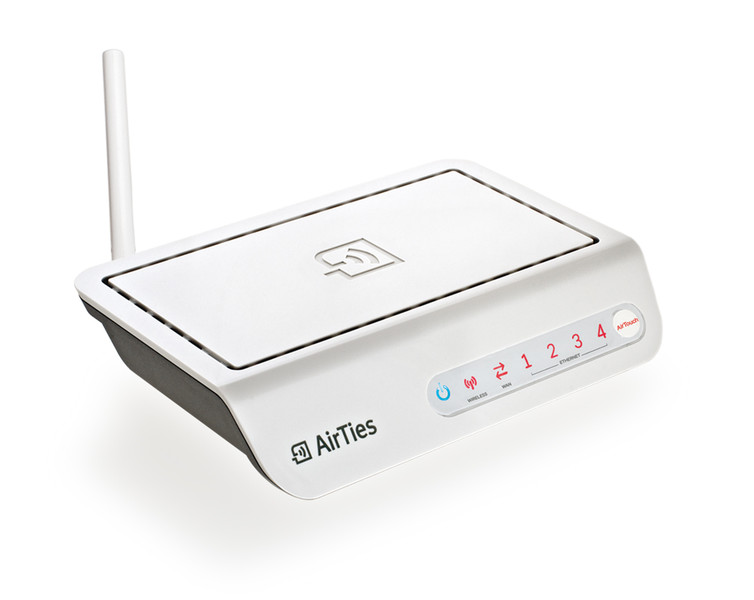
150Mbps Wireless 4-Port Router, IEEE 802.11b, 802.11g, 802.11n, 802.11e & 802.11i
- Multi Functional: 150Mbps wireless access point, Firewall, Router.
- “N-Fast” wireless communication: 150Mbps wireless access point, compliant with the 802.11n standard.
- AirTies MESH Technology increases coverage area in concrete buildings where coverage problems can be experienced.
- AirTouch: Support for easy, safe and automatic installation of wireless network settings, by the single touch of a button on the device.
- Expand your wireless coverage area with the single touch of a button: Installing an AirTies MESH Network or expanding your wireless network are now both incredibly easy with AirTouch technology! With AirTouch, you can expand your network as much as you wish, and you can use WPA2, the latest wireless safety protocol, on your MESH network.
- A separate wireless network for guests (using the VLAN and MSSID feature set).
- Firewall: Enhanced anti-DoS SPI Firewall; MAC, URL and IP address-based filtering.
- Automatic software updates: Automatic software updates installed by the AirTies Network Assistant. Using the most up to date software is important for obtaining the maximum performance from your device.
- Router: An advanced router that supports a DHCP server, NAT, NAPT, DMZ and VLANs.
- Remote Management: Remote management, with Web, TR-069 and Telnet support.
- With its MSSID (Multiple SSID) support, you have the opportunity to install multiple wireless networks with a single Air 4340.
- Backward Compatible: Full compatibility with 802.11a/b/g devices and with Centrino/Centrino 2 laptops.
- Enhanced Wireless Security: Support for WPA2-Enterprise, WPA2-Personal, WPA-Enterprise, WPA-Personal, and WEP wireless encryption standards; MAC filtering and SSID Masking.
- Uninterrupted technical support: 24/7 AirTies Technical Support Hotline, highly skilled technical support staff from the AirTies R&D team.
- An extended warranty: 3 year warranty period.
With AirTies Mesh Technologies, no more getting stuck between concrete walls!
AirTies Mesh Technology resolves the problem of signal weakening, experienced inside multi‐storey reinforced concrete buildings and over wide areas. To expand your coverage area, all you need to do is use the Air 4340 Mesh protocol over the AirTies wireless repeaters connected to each AirTies Air 4340. Via the Mesh Technology, signal attenuation over long distances or through reinforced barriers is avoided. In addition, you can expand the wireless coverage area as much as you wish.
Automatic DHCP Detection
With its automatic DHCP detection, the Air4340 checks whether there is an available DHCP server, and automatically selects the correct operating mode (Wireless
Access Point or Router). For example, when you use an Air4340 behind a cablenet modem, it detects that there is no Router available, and it automatically switches to
Router mode. Similarly, when used behind an ADSL modem to create a wireless network, it detects that there is another Router available, and switches to Wireless access
point mode and automatically shuts down its DHCP server.
The user is not required to make any settings to utilize these features: each Air4340 automatically configures its DHCP server settings.
An Enhanced Router for Cablenet Users
The Air4340 can be used with a Cablenet modem that lacks a Router, enabling the simultaneous connection of multiple computers to the Internet. Each user only needs to
connect an ethernet cable between their Cablenet Modem and the WAN port of an Air4340. The Air4340 then automatically switches to Router mode, thus enabling the
users connected to the Air4340 to access the Internet. In addition to the wired computers connected to its 4 LAN ports, wireless users can also connect the internet over an 4340.
A Separate and Safe Wireless Network for Guests
With VLAN (Virtual LAN) and Multiple SSID support, guest users can connect to the wireless network and access the internet; but are prevented from accessing the general
company network on which private data is held. To do this, all you need is to do is create a second wireless network for guests on the Air4310, and then define that wireless network as a separate VLAN. So, the guests will be able to access the internet via a different virtual network than the company network, and they will not be able to access the company files.
With AirTouch, set up your entire
wireless network with the single push of a button! AirTouch Enables Advanced Wireless Network Security: AirTouch eliminates the arduous configurations that used to be required to achieve the highest levels of security: it has simplified the entire set up to one click of the device’s “AirTouch” button. AirTouch technology automatically and quietly installs the settings required for the highest levels of security.
It Extends the Range of your Wireless: AirTouch makes it possible to build a Mesh
Network, expanding your wireless network. You can add new Access Points to your
wireless network with an AirTouch – expanding your network’s limits – without any specialist assistance. To install all of these settings, all you need to do is click the “AirTouch” button on each wireless access point. So, you can easily add repeater access points to your wireless network, expanding your wireless network as much as you want to.
Facilitates Wireless Network Management: Through AirTouch, certain modifications that
you might make to your computer network are automatically shared over each of the wireless access points. This feature removes the hassle of adjusting each and every access point, one by one, whenever you want to change the wireless Mesh Network’s password. A change that you make on one wireless access point is automatically communicated to each of the other wireless points. Managing a wireless network with AirTouch is just so easy!!
Control your whole network from a
single point, so easily stay up-to-date! AirTies Network Assistant is an application that
can run on users’ personal computers, allowing each user to setup and then monitor their settings and the network.
It is designed so that all types of users can easily operate it, whatever their levels of technical understanding are.
It informs you whenever there is an available update for your device’s Firmware and, if you want, it will update your device’s Firmware automatically. Install the most recent firmware to obtain the highest performance from your device, and to benefit from each newer technology.