License
| License type |
Education (EDU) |
Software
| Mac operating systems supported |
Y |
Keynote '09, Education only
<b>Crowd Pleaser.</b>
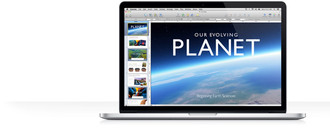
Keynote makes you a hard act to follow. Because it’s easy to create captivating presentations using powerful tools and impressive effects. And Keynote is optimized for the new MacBook Pro with Retina display, so you’ll make your point perfectly clear.
<b>iCloud. Your presentations everywhere.</b>
<b>All your presentations. On all your devices.</b>
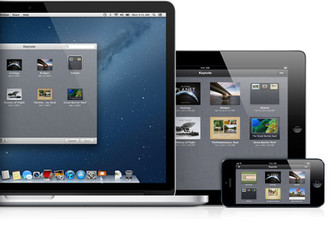
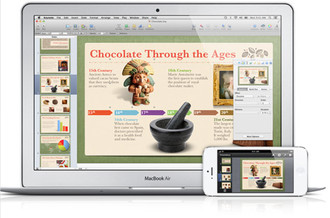
With iCloud, you can create presentations in Keynote on your Mac and access them on your iPad, iPhone, and iPod touch. And vice versa. Edit them from anywhere — on any device you use. Changes you make to a presentation on one device automatically happen on all your devices. So you always have the latest version of your work. And suddenly, your presentation skills are even more excellen
<b>Easy from the start.</b>
<b>It presents beautifully.</b>
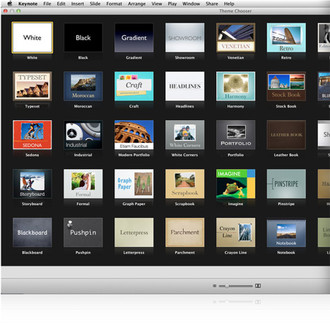
Even if you’ve never used Keynote before, you’ll find creating a presentation surprisingly simple. It all starts with an enhanced Theme Chooser that lets you preview an impressive collection of 44 Apple-designed themes. Drag across a theme to skim through its slide designs. Once you’ve chosen the perfect canvas for your presentation, simply substitute your own words and images for the placeholder text and graphics. Thanks to the Slide Navigator, the progress of your presentation and its organization are always in view.
Easy-to-use tools let you add elements such as tables, charts, media, and shapes to your slides. Add a table with a click. Just as easily add a 3D chart that you can animate. With the Media Browser, you can drag and drop photos from your iPhoto or Aperture libraries, movies from your Movies folder, and music from your iTunes library.
<b>Powerful graphics tools.</b>
<b>Looking good comes easy.</b>
Make each slide in your presentation look its absolute best using the powerful graphics tools built into Keynote. Quickly and cleanly remove the background of an image using the Instant Alpha tool. Or mask it within a predrawn shape, such as a circle or a star. With alignment and spacing guides, you can easily find the center of the slide and see if objects are spaced evenly. So anything you add to your slides — graphics, images, text boxes, or shapes — is placed precisely where you want it. If you’re adding a flowchart or a diagram to your slide, then you’ll appreciate the connection lines feature. Connection lines between two objects remain anchored, no matter what changes you make. Move the objects around, and the lines move with them.
<b>Standing ovation highly likely.</b>
With your choice of more than 25 transitions, including 3D transitions, you’re sure to keep their eyes riveted to the screen as you move from one slide to the next. Apply the Magic Move transition and a repeated object, such as your company’s logo, automatically changes location, scale, opacity, and rotation across consecutive slides.
Text and object animations are a compelling way to punctuate your message. Morph text on one slide into text on the next slide. Build your slide one bullet point, table row, or chart series at a time. Or have it all appear at once, entering stage left or spinning onto the screen. You can fine-tune your animations by setting the duration, choosing which element is affected first, and defining the animation path along a straight line or a curve.
<b>3D charts and chart animations.</b>
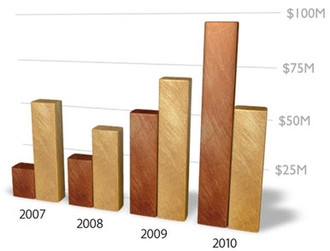
Make your charts as impressive as the rest of your presentation. 3D textures and animations add depth and movement and a touch of fun. Insert a pie chart with a beveled edge or animate a bar chart using Crane or Radial effects
<b>Flexible ways to present.</b>
<b>Your show. Your way.</b>
Keep the pace of your presentation flowing smoothly with the Presenter Display feature. While your presentation appears on the main display for your audience, you can see the current and next slides, your slide notes, a clock, and a timer on a second display. Can’t be there to present in person? The show can still go on. Using the built-in narration tool, Keynote captures your audio voiceover and timing as you step through builds or move from one slide to the next.
Add Keynote Remote* to your iPhone or iPod touch and feel free to roam around the room while you present. Using Wi-Fi, Keynote Remote turns your iPhone or iPod touch into a wireless controller. In landscape view, see the current and next slides. In portrait, see the current slide with your slide notes. Tap to play and swipe to advance, wherever you are in the room.
<b>Office compatibility and sharing.</b>
<b>Approved for all audiences.</b>
Keynote gives you a variety of ways to bring your show to the people. You can use it to import presentations created in Microsoft PowerPoint and to create presentations that can easily be saved as PowerPoint files. You can also export your presentation as a QuickTime movie or a PDF, HTML, or image file, or even directly to YouTube. Keynote does the format conversion for you