Features
| Reset button |
Y |
| Rack mounting |
N |
Performance
| Supported network protocols |
HTTP, TCP/IP, SMTP, DHCP, Static IP, DNS, DDNS, FTP, NTP, UPnP |
| Number of fans |
1 |
| Backup function |
Y |
| Processor frequency |
2.6 GHz |
| Built-in processor |
Y |
| Maximum frame rate |
30 fps |
| PTZ control (Pan/Tilt/Zoom) |
Y |
| DHCP server |
Y |
| DHCP client |
Y |
| Internal memory type |
DDR3 |
| Internal memory |
4000 MB |
| Throughput data rate |
250 Mbit/s |
| Video input channels |
8 |
| Ethernet LAN data rates |
1000 Mbit/s |
Storage
| RAID support |
Y |
| Number of hard drives supported |
4 |
| Maximum storage capacity |
24 TB |
| Hard drive interface |
Serial ATA II, Serial ATA III |
Ports & interfaces
| USB 3.0 (3.1 Gen 1) Type-A ports quantity |
2 |
Additionally
| Ethernet LAN (RJ-45) ports quantity |
2 |
| On/Off switch |
Y |
| Выход HDMI |
Y |
4GB RAM, Flash 512 Mb, SATA III, 24TB max, 2 x RJ-45, 2 x USB 3.0, 5 x USB 2.0
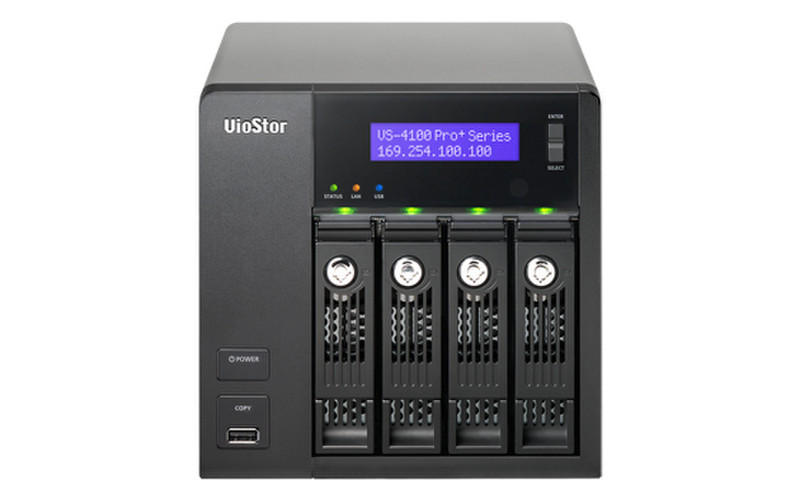
Powered by the Intel ® dual-core processor and 4GB of memory, the VS-4116 Pro+ delivers high performance to ensure stable recordings and smooth playbacks of multiple megapixel cameras. It is designed for the SMB segment with the features of robust performance, solid reliability and high-definition local display.
- 250 Mbps for recording and playback from multiple megapixel cameras
- HDMI output delivers up to 200fps Full HD local display
- Simultaneously handles inputs from up to 16 megapixel cameras
- Large capacity to ensure continuous high-resolution video recording
- Install free QSCM Lite from App Center to enjoy advanced CMS features
<b> Ultra high performance</b>
Powered by the Intel® dual-core processor and 4GB of DDR3 memory, the VS-4116 Pro+ is capable of recording videos from up to 16 IP cameras, delivering exceptional performance with up to 250 Mbps throughput to ensure stable recording of multiple megapixel IP cameras.
<b> PC-less network surveillance by full HD local display via HDMI connector</b>
Even without a PC, the VS-4116 Pro+ can be configured and perform monitoring tasks with the local display technology by connecting a USB mouse, USB keyboard and HDMI monitor to deliver lag-free live video monitoring in Full HD (1920x1080) resolution. QNAP local display technology provides a straightforward way to reduce the total costs in your business environment.
<b> Anytime anywhere surveillance with a mobile app</b>
Vmobile is an official mobile app that enables you to monitor QVR anytime, anywhere. Using iOS and Android devices, Vmobile provides camera live-view, PTZ control, instant event notifications, video snapshot, video playback, and searching for videos by date and time. Another mobile app, Vcam, allows you to turn your mobile device into a network camera and to directly save recordings to your VioStor NVR for portable surveillance options.
<b> Turn your NVR into a CMS server</b>
QSCM Lite is a free app provided by QVR that allows you to easily deploy up to 16 QNAP NVRs and 256 cameras and conduct central monitoring, playback, and management. With no extra server hardware required, QSCM Lite can easily turn the VS-4116 Pro+ into a CMS server. The powerful and pioneering QSCM Lite can be freely downloaded from the integrated NVR App Center.
<b> Qstart- Innovative one-click auto configuration</b>
Qstart simplifies system initialization and network switch control for users to experience effortless NVR installation and remote maintenance. While providing quick initial setting in few clicks, Qstart integrates major functions of PoE switches and can set up camera IPs automatically. Users can easily manage PoE or network on/off and monitor devices status and network traffic flow. Its intuitive GUI and event notification allow for precise failure detection and efficient troubleshooting.
<b> Intuitive, zero learning</b>
Unlike traditional NVR software that can be hard to use, QVR 5.0 is free from complicated options and terminology, offering an innovative desktop design to compliment smooth working efficiency. The multi-window design allows concurrent multi-tasking, and enables administrators to easily switch between tasks to increase their productivity.
<b> Multiple IP camera management comes easy</b>
You can directly configure IP camera recording schedules when needed without leaving the Live-view page, maintain a seamless monitoring so you won’t miss any suspicious events. You can also visualize IP camera deployment with the E-map function. Just upload the pictures of the monitored locations, drag and drop the IP camera icons to the right place on the E-map, and you can easily monitor your surveillance deployment at a glance.
<b> Cruise for wider areas, zoom in for greater detail</b>
With QVR system, users can easily manage & monitor multiple IP cameras in a real-time basis using web browsers, and attain the first-hand status of monitored corners. You can directly adjust the PTZ (Pan/Tilt/Zoom) functions of supported cameras, flexibly monitoring every desired corner and detail. Auto-cruising is also supported to allow you to define preset positions for PTZ cameras to automatically adjust their monitoring angles to preset positions by the time interval.
<b> Find out the critical recordings without the hassle</b>
How to find suspicious alarm recordings from huge amount of recordings can be a challenge. QVR 5.0 provides an intuitive playback interface to you to easily distinguish between regular and alarm recordings in the timeline bar. For greater efficiency, you can also enable Intelligent Video Analytics (IVA) to quickly search videos corresponding to particular modes (includes motion detection, foreign/ missing object, out of focus, and camera occlusion) to screen for critical recordings.
<b> Optimize your video watching experience with video transcoding</b>
The transcoding capabilities of the VS-4116 Pro+ allows users a practical solution for watching videos stored in centralized locations via the Internet when they have low-bandwidth connections. This feature adapts to bandwidth limits and/ or devices that lack the hardware or codecs to play video files by converting a video file to a lower resolution before transferring it across the Internet. The original high definition video is still retained without any changes being made to it, balancing the whole surveillance system for local recordings and remote playback.
<b> Flexible recording functions</b>
QVR 5.0 provides flexible options to set up IP camera recording, including manual recording and scheduled recording. What can be even more convenient, you can set up the system to only record when motion is detected or other events occur. The smart recording function can also automatically switch the recording detail to a higher resolution when alarms are triggered. This greatly saves the cost spent on hard drives.
<b> Economical expansion options</b>
By installing the Storage Expansion app on a QNAP Turbo NAS, you can connect the VioStor NVR with the Turbo NAS via network to flexibly enlarge the total storage capacity of the VioStor NVR. If the expanded storage is not enough, QNAP REXP expansion enclosures can be used to expand the storage space on the connected Turbo NAS to support hundreds-of-terabytes raw capacity.
Availability: The storage expansion solution is available for VioStor NVR Pro(+) series with firmware v4.1.1 or newer and the Turbo NAS TS-x51, TS-x53, TS-x53U, TS-x63, TS-x70U, TVS-x71, TVS-x71U, TVS-ECx80, TVS-ECx80U series with QTS operating system v4.1.2.