Ports & interfaces
| XLR in |
Y |
| XLR out |
1 |
| Microphone in |
Y |
| USB port |
Y |
Technical details
| Mixer section |
Y |
| USB direct playback |
Y |
Power
| Input voltage |
100 - 240 V |
| Power supply type |
AC |
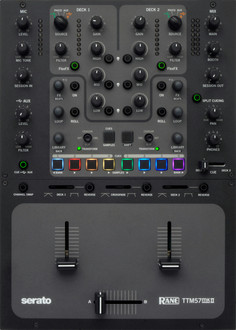
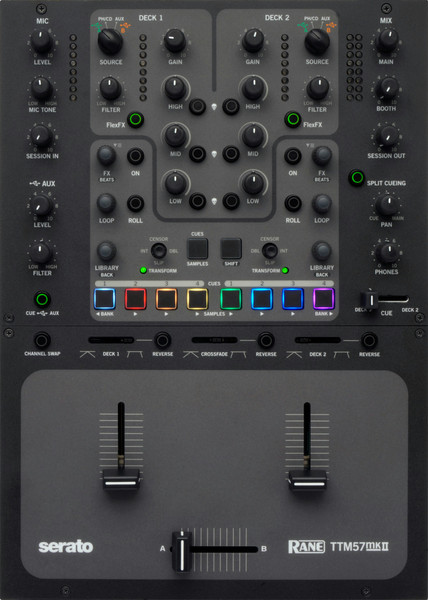
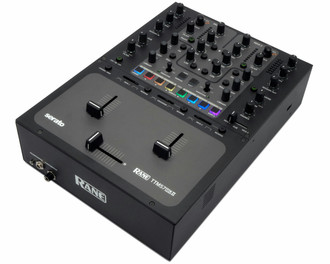
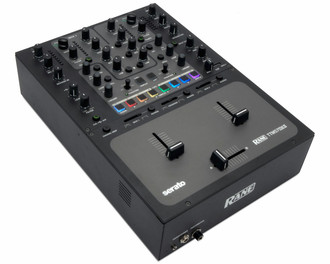
DJ mixer, 2 Deck Bus Controls, 4 RCA jacks, Balanced 1/4˝ TRS & XLR combination jack, USB Audio, Direct Serato Deck Controls
Two Deck Bus Controls
Each bus selects USB Port A or B computer playback, a Phono / CD deck input, or an Aux line-level input.
- Gain trim and metering.
Sweepable Low / High-pass effect Filter.
3-band full-cut tone controls:
- Kill switches are momentary on/off.
- Press SHIFT and a Kill to latch it on.
Direct Serato Deck Controls
Software FX on/off button.
FX knob parameter adjustment:
- Turn to scroll through FX.
- Press to select the FX.
- Hold SHIFT to change the Beats parameter.
LOOP knob selects the loop length.
- Press it to engage Auto Loop.
- Hold down ROLL for Loop Roll.
LIBRARY knob scrolls songs or crates:
- Press to load a song or crate.
- Hold SHIFT to tab between song and crate selection.
TRANSFORM joystick:
- Press for Transform on/off.
- Transform on: any direction cuts the audio.
- Transform off: multifunction software control (gray text).
Trigger Serato DJ Cues and Samples
CUES / SAMPLES button toggles between Cues and Samples.
- The button is lit when Cues are active.
Four Cues per Deck. The active USB follows the Deck source selection.
- Lit button colors match the Cue colors in Serato DJ software.
- Press an un-lit button to create a new Cue. Hold SHIFT to delete a Cue.
Six Sample triggers and Bank select buttons (Bank up and Bank down).
- A lit button indicates a ready-to-play sample in Serato DJ.
The USB Aux Input is usually from the Serato SP-6 sample player, with it's own Level control, Low / High-pass sweep Filter and headphone cue. The USB Cue overrides any Deck Cue when it's on.
Dual USB Ports for Simple DJ Changeover
With a computer plugged into each USB port, simply switch a mixer Deck selector to USB A or USB B and audio and MIDI are assigned. Seamlessly switch from one DJ to the next using Serato DJ or other 3rd-party audio software.
Each port can stream 20 channels of low-latency audio at 44.1, 48, or 96 kHz.
A typical setup includes two Serato DVS decks, software FX through independent USB digital inserts for each Deck, and the SP-6 sample player on its own USB Aux input.
Deck Cue, Pan, and Split Cue
The Cue slider cues Deck 1 or Deck 2 by moving the slider accordingly. This lets you adjust a Deck volume in the headphones without raising the Deck Gain control.
When Split Cue is off, the Cue / Main Pan knob balances how much stereo cue and stereo main mix you hear in the headphones.
When Split Cue is on, the Cued Deck goes to the left headphone cup and the Main mix goes to the right cup. The Cue / Main Pan knob balances how much Cue (left) and Main (right) is heard in the headphones.
TTM57mkII Unique Features
- Channel High, Mid, and Low Kill switches
- Filter Resonance adjustment
- MIDI-mappable footswitch jack
- SP-6 Sampler Input Filter control
- SP-6 Sampler Input Headphone Cue
- Headphone Split Cueing control
- Changeable EQ crossover points
- Transform Joysticks with extra functions
- Easy access to Serato deck INT mode
- Slip ON/OFF controls
- Scroll access through all Serato DJ-FX
- Serato DJ-FX Wet/Dry controls
- Session Output with Volume Control
- External effects processor loop with +4 & -10 levels
- Up-fader Channel Swap switch